
Flask-Gopher



About
Flask-Gopher is an extension library for the Python Flask web microframework that adds support for gopher request handling. The Gopher Protocol is an alternative to HTTP that peaked in popularity in the mid 90's. There are still a handful of gopher sites maintained by enthusiasts; you can learn more about its history at http://gopher.floodgap.com/gopher/
This extension works by adding a thin Gopher => HTTP compatability layer into Flask's built-in WSGI server. It turns gopher requests into pseudo HTTP GET requests so they can be handled by Flask (or any other python WSGI app) natively. This means that you get full access to Flask's routing, templating engine, debugger, and other tools to build your gopher server.
This project exists because I wanted a modern python gopher server with support for dynamic routing. I was considering writing one from scratch in the same vein as Flask, but then I thought "Why not just use Flask?"
Installation
This package requires python 3
pip install flask_gopher
Quickstart
from flask import Flask
from flask_gopher import GopherExtension, GopherRequestHandler

app = Flask(__name__)
gopher = GopherExtension(app)

@app.route('/')
def index():
    return gopher.render_menu(
        gopher.menu.title('My GopherHole'),
        gopher.menu.submenu('Home', url_for('index')),
        gopher.menu.info("Look Ma, it's a gopher server!"))

if __name__ == '__main__':
   app.run('127.0.0.1', 70, request_handler=GopherRequestHandler)
Gopher and WSGI
Python's WSGI (Web Server Gateway Interface) is an established API that defines how python web servers (gunicorn, mod_wsgi, etc) communicate with application frameworks (Flask, Django, etc). It defines a clean boundary between low-level socket and request handling, and high-level application logic.
WSGI was designed to be a very simple and flexible API, but at its heart it's built around HTTP requests. As such, it incorperates some HTTP specific components like request/response headers and status codes. Gopher is more basic and doesn't use these components. Here's an example of the difference in fetching a document with the two protocols:
| HTTP | Gopher | ||
|---|---|---|---|
| request | response | request | response |
GET /path HTTP/1.1 Accept: text/plain Accept-Charset: utf-8 ...more headers |
HTTP/1.1 200 OK Server: Apache Content-Type: text/html ...more headers |
/path\r\n |
(body) |
In order to resolve the differences between gopher and HTTP, Flask-Gopher implements a custom GopherRequestHandler. The handler hooks into the WSGI server (werkzeug.BaseWSGIServer). It reads the first line of every TCP connection and determines which protocol the client is attempting to use. If the client is using gopher, the following assumptions are made:
- Set the request's REQUEST_METHOD to
GET - Set the request's SERVER_PROTOCOL (e.g. HTTP/1.1) to
gopher - Set the request's wsgi.url_scheme (e.g. https) to
gopher - Discard the response status line
- Discard all response headers
Doing this makes a gopher connection appear like a normal HTTP request from the perspective of the WSGI application. It also provides metadata hooks that can be accessed from the Flask request.
@app.route('/')
def index():
    if flask.request.scheme == 'gopher':
        return "iThis was a gopher request\tfake\texample.com\t0\r\n"
    else:
        return "<html><body>This was an HTTP request</body></html>"
Building Gopher Menus
Gopher menus are structured text files that display information about the current page and contain links to other gopher resources. A gopher menu is loosely equivalent to an HTML document with only <a> and <span> tags. Each line in the menu has a type that decribes what kind of resource it links to (text, binary, html, telnet, etc.).
Flask-Gopher provides several helper methods for constructing gopher menu lines:
| Method | Link Descriptor | Meaning |
|---|---|---|
| menu.file | 0 | Plain text file |
| menu.submenu | 1 | Gopher menu |
| menu.ccso | 2 | CCSO database; other databases |
| menu.error | 3 | Error message |
| menu.binhex | 4 | Macintosh BinHex file |
| menu.archive | 5 | Archive file (zip, tar, gzip) |
| menu.uuencoded | 6 | UUEncoded file |
| menu.query | 7 | Search query |
| menu.telnet | 8 | Telnet session |
| menu.binary | 9 | Binary file |
| menu.gif | g | GIF format graphics file |
| menu.image | I | Other Image file |
| menu.doc | d | Word processing document (ps, pdf, doc) |
| menu.sound | s | Sound file |
| menu.video | ; | Video file |
| menu.info | i | Information line |
| menu.title | i | Title line |
| menu.html | h | HTML document |
Most of these methods require a text description for the link, and will accept a path selector and a host/port. They return a line of text that has been pre-formatted for a gopher menu. You can then pass all of the lines along into gopher.render_menu() to build the response body.
@app.route('/')
def index():
    return gopher.render_menu(
        # Link to an internal gopher menu
        gopher.menu.submenu('Home', '/'),

        # Link to an external gopher menu
        gopher.menu.submenu('XKCD comics', '/fun/xkcd', host='gopher.floodgap.com', port=70),

        # Link to a static file, using flask.url_for() to build a relative path
        gopher.menu.image('Picture of a cat', url_for('static', filename='cat.png')),

        # Link to an external web page
        gopher.menu.html('Project source', 'https://github.com/michael-lazar/flask-gopher'),

        # Info lines display text in the menu
        gopher.menu.info('This is informational text'),

        # Plain text will be converted into info lines
        "\n    There's no place\n    like ::1\n",

        # Or you can build the lines manually
        "0About this page\t/about.txt\t127.0.0.1\t8007")
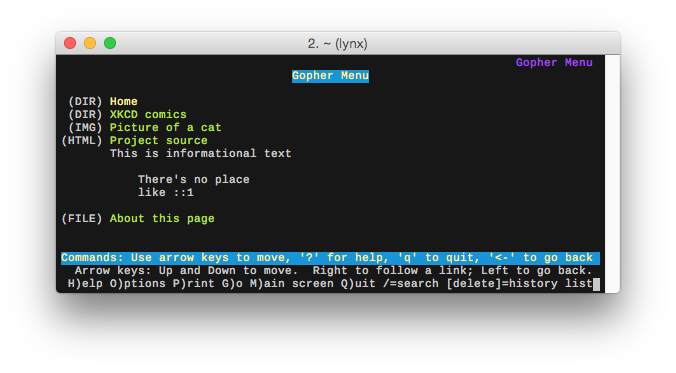
Here's what the rendered menu looks like:
$ curl gopher://localhost:8007
1Home   /   127.0.0.1   8007
1XKCD comics    /fun/xkcd   gopher.floodgap.com 70
IPicture of a cat   /static/cat.png 127.0.0.1   8007
hProject source URL:https://github.com/michael-lazar/flask-gopher   127.0.0.1   8007
iThis is informational text fake    example.com 0
i   fake    example.com 0
i    There's no place   fake    example.com 0
i    like ::1   fake    example.com 0
i   fake    example.com 0
0About this page    /about.txt  127.0.0.1   8007
Using Templates
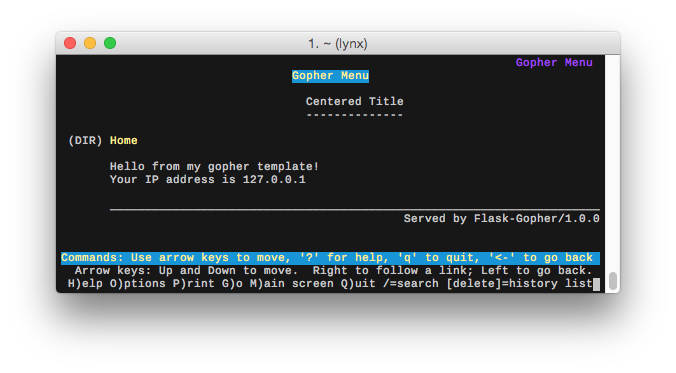
You can use Flask's Jinja2 templating engine to layout gopher menus. Flask-Gopher will automatically inject the gopher object to the template namespace so you can access the menu helper functions. The recommended naming convention for gopher template files is to add a .gopher suffix. An example template file is shown below:
templates/example_menu.gopher
{{ 'Centered Title' | center }}
{{ '--------------' | center }}

{{ gopher.menu.submenu('Home', url_for('index')) }}

Hello from my gopher template!
Your IP address is {{ request.remote_addr }}

{{ '_' * gopher.width }}
{{ ('Served by ' + request.environ['SERVER_SOFTWARE']) | rjust }}
Call gopher.render_menu_template() from inside of your route to compile the template into a gopher menu.
@app.route('/')
def index():
    return gopher.render_menu_template('example_menu.gopher')
Gopher Protocol References
- https://tools.ietf.org/html/rfc1436 (1993)
- https://tools.ietf.org/html/rfc4266 (2005)
- https://tools.ietf.org/html/draft-matavka-gopher-ii-03 (2015)
- https://www.w3.org/Addressing/URL/4_1_Gopher+.html
An interesting side note, the python standard library used to contain a gopher module. It was deprecated in 2.5, and removed in 2.6. (https://www.python.org/dev/peps/pep-0004/)
Module name:   gopherlib
Rationale:     The gopher protocol is not in active use anymore.
Date:          1-Oct-2000.
Documentation: Documented as deprecated since Python 2.5.  Removed
               in Python 2.6.
There's also still a reference gopher client in the old python SVN trunk: https://svn.python.org/projects/python/trunk/Demo/sockets/gopher.py